
Web Development
Saket Khare
CTO & Co-Founder
Building a website used to be a very simple decision. Ten years ago, you hired a developer, they installed WordPress, and you were done. There was no debate.
Today? The landscape is an absolute battlefield. You Google how to build a website, and you instantly get bombarded with aggressive ads. Your designer friend tells you to use Framer. Your tech friend tells you to use Webflow. Your marketing agency insists on WordPress.
It is incredibly overwhelming. You are just trying to run your business. You do not have time to learn three different software platforms just to figure out which one is right. But picking the wrong one is a very expensive mistake.
Here is a wild fact to consider. Right now, over 43% of the entire internet runs on WordPress. However, massive companies and agile startups are abandoning it every single day for modern no-code tools. They want speed. They want better design. They are tired of things breaking.
I have built hundreds of websites across all of these platforms. I know exactly where they shine. I also know exactly where they completely fall apart.
In this guide, we are going to sit down and have a straightforward conversation about Framer vs Webflow vs WordPress. No heavy tech jargon. No agency sales pitches. Just a clear, honest look at the best platform for your business in 2026. By the end of this page, you will know exactly where to put your money.
The 60-Second Snapshot
I know you have a company to run. If you are rushing into a meeting and just need the quick answers, here is the absolute simplest breakdown of these three platforms.
Framer: This is the speed demon. It feels like a design tool but outputs a live website. Perfect for stunning, fast marketing sites.
Webflow: This is the powerhouse. It writes incredibly clean code visually. Perfect for highly custom sites that need to scale massively.
WordPress: This is the old giant. It can literally do anything if you add enough plugins. Perfect for massive blogs or complex custom setups, but it requires constant maintenance.
That is the high-level view. Now, let’s grab a coffee and look at exactly what these tools actually do behind the scenes.
Contender 1: WordPress - The Open-Source Giant
We have to start with the grandfather of the internet. WordPress has been around since 2003. It is open-source. That means no single company owns it. Anyone can download the core software for completely free.
Because it has been around forever, the ecosystem is massive. There are over 50,000 plugins available. If you want your website to do something weird, there is probably a plugin for it.
You want to sell physical shoes? Install WooCommerce. You want to create a private membership forum? Install a forum plugin. It is incredibly flexible.
However, this flexibility comes with a massive dark side. It is old technology. It relies entirely on third-party developers updating their plugins. If one plugin breaks, your whole website can crash. It feels a bit like holding a house together with duct tape.
The Realities of WordPress in 2026
Using WordPress today requires a very specific mindset. You have to be prepared to act like a mechanic.
When you build a site here, you have to buy your own hosting server. You have to install the software. You have to constantly update your themes. Hackers target WordPress constantly because it is so popular. You absolutely must pay for top-tier security.
For a busy founder, this is exhausting. You just want to publish a new landing page. Instead, you log in and see 14 different plugin update warnings.
But I will give it credit where it is due. If you are building a massive media publication with 10,000 articles, nothing beats it. The database architecture is incredibly robust. It was built for blogging, and it still wears that crown proudly.
Contender 2: Webflow - The Visual Coding Powerhouse
If WordPress is an old, reliable truck, Webflow is a modern sports car. It completely changed the web design industry a few years ago.
Webflow is not just a site builder. It is a visual coding engine. When a developer uses Webflow, they are actually writing real HTML, CSS, and JavaScript. They are just doing it using a visual interface instead of typing out text.
This means the code it produces is incredibly clean. It is lightning fast. Google absolutely loves Webflow sites because they load instantly.
You do not have to worry about buying servers or updating plugins. Webflow hosts the site for you. They handle all the security. You just hit the "Publish" button and go to sleep peacefully.
The Webflow Learning Curve
Webflow is incredibly powerful. But that power comes with a very steep wall.
You cannot just log into Webflow as a beginner and build a great site in an afternoon. It requires a deep understanding of web development rules. You have to understand how "div blocks" and "flexbox" work.
If you hand a Webflow site to an inexperienced marketing intern, they will likely break the layout. It requires professional hands to build and maintain the core structure.
However, their Content Management System (CMS) is brilliant. Once a professional developer sets up the site, adding a new blog post is incredibly easy. Your marketing team can just fill out a simple form, and Webflow automatically creates a beautifully designed page.
Contender 3: Framer - The Design-First Speed Demon
Framer is the newest kid on the block, and it is taking the startup world by absolute storm.
If you have ever used a design tool like Figma, you already know how to use Framer. It feels exactly like a graphic design canvas. You draw a box, you pick a color, you type some text. Then, you click publish. The site goes live instantly.
It is built on a modern coding language called React. This means the websites feel incredibly smooth. The animations are breathtaking. You can make text fade in, images slide across the screen, and buttons glow with just two clicks.
Framer is built for pure speed. Startups love it because they can design a stunning landing page in the morning and have it live on the internet by dinner time.
The Limits of Framer
Framer sounds perfect, right? It is amazing, but you have to understand its limits.
It is primarily a tool for marketing websites. It is built to make you look incredibly professional and get visitors to click a button.
It is not built for heavy data. If you have a massive e-commerce store with 5,000 products, Framer will struggle. If you need users to log into a private portal, Framer is not the right choice.
Their CMS is getting better every month, but it is still quite basic compared to Webflow or WordPress. It is the absolute best platform for your business in 2026 if you need a fast, beautiful, animated marketing site to raise funding or sell a SaaS product.
Direct Match-Up: Framer vs Webflow vs WordPress
Sometimes it helps to just look at the raw facts side by side. I put together this simple chart. It shows you exactly how these platforms stack up against each other across the most important categories
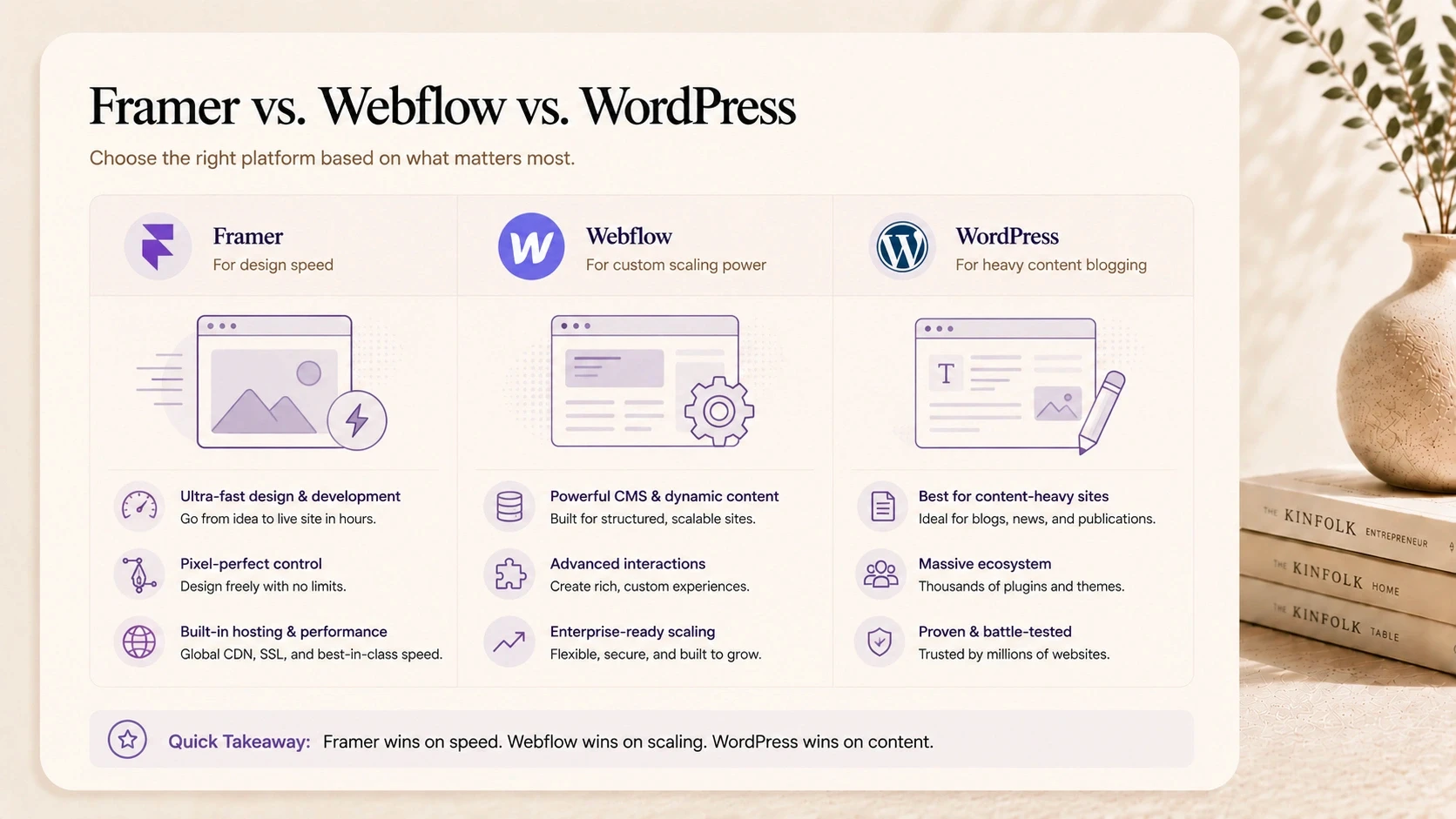
The 2026 Platform Comparison
Feature | WordPress | Webflow | Framer |
Ease of Use (Beginner) | Moderate | Very Hard | Very Easy |
Design Flexibility | Limited by Theme | Limitless | Limitless |
Animation Capabilities | Poor | Excellent | Mind-Blowing |
Blogging / CMS Power | World-Class | Very Strong | Basic but Growing |
Maintenance Required | High (Updates needed) | Zero (Managed) | Zero (Managed) |
Use this table as your compass. If you want mind-blowing animations with zero maintenance, look right. If you want world-class blogging with high maintenance, look left.
How Do They Handle SEO?
Search Engine Optimization (SEO) is how Google finds you. If Google cannot read your site, you will not get any traffic. You will not make any money.
Ten years ago, WordPress was the undisputed king of SEO. Tools like the Yoast plugin made it incredibly easy to rank on Google. It is still fantastic today.
But Webflow has completely caught up. Because Webflow writes such clean code, it loads incredibly fast. Google uses page speed as a massive ranking factor now. Webflow gives you total, granular control over every single SEO tag without needing any extra plugins.
Framer is also incredibly fast. However, because it is built on React, some older search engines occasionally struggle to read it perfectly. For standard Google searches, all three will perform great, but Webflow currently offers the cleanest technical SEO foundation right out of the box.
The E-Commerce Debate: Selling Products Online
If you are selling physical goods like t-shirts or coffee beans, your platform choice shifts dramatically.
WordPress has WooCommerce. It powers a massive chunk of all online stores globally. It is free to install, but it gets very clunky very fast. Managing inventory inside WordPress is not always a fun experience.
Webflow has a built-in e-commerce engine. It allows you to design a completely custom shopping cart. You can make the checkout experience look completely unique. However, it lacks some advanced shipping and tax calculation features that massive stores need.
Framer does not have native e-commerce yet. You have to connect it to an outside tool like Shopify or LemonSqueezy to process payments.
Honestly? If your entire business model is just selling physical products, you should probably skip all three of these and just use Shopify.
Let’s Talk Money: The Real Cost Breakdown
Budgets matter. You need to know exactly what you are going to pay every single month to keep your site alive.
WordPress claims to be free. This is a massive trap. Yes, the software is free. But you have to pay $20 a month for a good hosting server. You have to pay $50 a year for a premium theme. You might pay $200 a year for premium security plugins. It adds up very quickly.
Webflow and Framer are Software as a Service (SaaS). You pay them a flat monthly fee, and they handle everything. No server costs. No security costs.
A standard Webflow plan for a growing business will cost around $25 to $40 a month. A standard Framer plan sits around $20 to $30 a month. When you factor in the value of your own time not spent fixing broken plugins, the monthly fee for Webflow or Framer is an absolute steal.
The Handover Test: What Happens When the Agency Leaves?
Founders rarely build their own websites. You will probably hire an agency or a freelancer. But what happens when their contract ends?
This is what I call the handover test. Your marketing team has to take over the site. They have to change text. They have to swap out images.
If you use WordPress, your team will probably be okay. The dashboard is clunky, but it is familiar to most marketers.
If you use Webflow, you have to be very careful. The developer must use the Webflow "Editor" mode. This is a safe space where your team can change text without accidentally deleting the whole homepage layout.
If you use Framer, the handover is a dream. It is so visual and intuitive that a marketing intern can learn how to change an image in about five minutes.
Security Realities in 2026
You cannot ignore hackers. Small businesses are targeted every single day by automated bots looking for vulnerabilities.
If you choose WordPress, security is 100% your responsibility. If you forget to update an old plugin, a bot will find it. They will inject spam into your site. It is a nightmare to clean up. You have to be vigilant.
Webflow and Framer operate in closed ecosystems. They employ massive teams of elite security engineers to protect their servers. You do not have to update anything. You do not have to install firewalls.
For a busy founder who just wants to sleep well at night, the managed security of Webflow and Framer is worth its weight in gold.
Scenario A: The Lean Startup
Let’s look at some real-world examples. Imagine you are a startup founder. You have a new AI tool. You need a website fast to show investors next week.
You do not have time for a two-month development cycle. You need something breathtaking, modern, and highly animated. You want investors to say "Wow" when they open the link.
In this scenario, Framer is the absolute winner. You can hire a designer, and they can have a stunning, interactive site live in a matter of days. It is the perfect tool for moving fast and looking incredibly premium.
Scenario B: The Scaling B2B Company
Now imagine you run an established B2B software company. You have 50 employees. You have a marketing team that publishes three massive blog posts every single week.
You need a website that feels completely custom. You need complex landing pages for different ad campaigns. You need a rock-solid database to hold hundreds of articles.
In this scenario, Webflow is your best friend. It gives you the custom, premium design of Framer, but it has the database power to handle massive amounts of content. It is built to scale with your company over the next five years.
Scenario C: The Massive Media Publisher
Finally, imagine you are starting an online magazine. You plan to have 20 different freelance writers logging into the site every day to post articles.
You need complex user roles. You need authors, editors, and admins. You need plugins that automatically syndicate your content across the web.
In this scenario, WordPress still holds the crown. It was literally built for this exact use case. The user management and deep publishing tools are unmatched by the modern visual builders.
Building Smart With Createxp
Choosing the platform is only half the battle. You still need someone to actually design and build it correctly. Managing freelancers and guessing which tool is right is a fast way to waste your budget.
This is exactly why we built Createxp. We are a close-knit design and development studio based in Bangalore, India. We do not push you toward a platform just because it is our favorite. We look at your actual business goals and pick the perfect tool for your specific needs.
We operate entirely in-house. We do not outsource your vision. Our UI experts and technical engineers sit at the same table. If your startup needs a blazing-fast Framer landing page to raise your seed round, we build it. If your enterprise needs a massive Webflow migration with complex CMS structures, we handle it seamlessly.
We combine the speed of a startup with the precision of a high-end agency. We respect your budget, we move fast, and we build digital products that we are incredibly proud to stand behind.
Stop Guessing Which Platform to Use.
You know your business. We know the technology. Let our Bangalore-based team analyze your goals and build a stunning, high-performing website on the exact right platform.
Get a Free Platform Consultation
Making Your Final Decision
We have covered a lot of ground today. The Framer vs Webflow vs WordPress debate is intense, but the choice is actually quite simple when you look at your own needs.
Do not let a developer bully you into using a platform just because it is the only one they know how to use. Your website is the digital storefront of your entire business. It needs to serve you, not the developer.
Take a step back today. Ask yourself what your primary goal is. Is it speed? Is it massive blogging? Is it custom animations?
Write that goal down on a piece of paper. Then, look back at the charts in this guide. The right answer will be staring right back at you. Your business deserves a world-class foundation. Pick your platform, hire the right team, and go build something amazing.
Core Takeaways Before You Build
Stop Following Trends: Do not pick a platform just because it is popular on X(Twitter) this week. Pick the one that fits your exact business goal.
Think About the Handover: You might hire an agency to build it, but your team has to update it. If the tool is too hard to use, your marketing team will hate it.
Cheaper Now Means Expensive Later: Free platforms often have massive hidden costs in maintenance and security fixes.
Content is King: If you plan to write hundreds of blog posts, your choice of platform matters immensely. Some handle massive databases much better than others.
Frequently Asked Questions (FAQ)
Is Webflow better for SEO than WordPress?
Neither is inherently "better" out of the box, but Webflow writes much cleaner, faster code automatically. Faster code means faster page loading, which Google loves. WordPress requires several heavy plugins to achieve the same level of granular SEO control, which can slow the site down.
Can I easily move my website from WordPress to Framer later?
Moving visual designs is impossible. You would have to completely rebuild the site from scratch in Framer. However, you can export your old WordPress blog posts (the text data) and easily import them into Framer's CMS database using CSV files.
Does my team need to know how to code to use these tools?
To build the site? Yes, Webflow requires a solid understanding of coding logic. However, once the site is built and handed over to you, your marketing team does not need to know any code. They can just use the simple editor mode to change text and images safely.
Why do agencies charge so much for Webflow development?
Because Webflow is essentially visual programming. You are not just paying someone to click a few buttons; you are paying a skilled developer to architect a robust, responsive HTML/CSS framework from scratch. It takes serious professional skill to do it right.
Is Framer actually good for a big company, or just for tiny startups?
Framer is absolutely scaling up. Many massive tech companies now use Framer for their primary marketing sites because it allows their design teams to publish updates instantly without waiting for the engineering department. It is perfect for big companies, as long as they don't need highly complex back-end databases.
Warning: Working With Us May Trigger Unstoppable Momentum