
UI UX Design
Neeha Fathima
CDO & Co-Founder
Picture this scenario. You are sitting at a coffee shop. You just had a brilliant idea for a brand new app.
You grab a napkin. You sketch out a few screens. You are excited. You might even have some seed funding ready to go. You think to yourself, "I just need a coder to build this, and I will be rich."
Let us stop you right there. This is exactly how massive project failures begin.
Nearly 70% of all new digital projects fail. They do not fail because the code was bad. They fail because of poor user acceptance. Users download the app, get completely confused by the navigation, and delete it within ten seconds.
You simply cannot afford to guess what your users want. Great software never happens by accident. It requires a highly deliberate plan.
If you want your app to succeed, you need professional product design services. You might be wondering what that actually means. You might be worried about how much time it takes. You might be confused about the steps involved.
Do not worry. We are going to explain everything to you right now.
We are speaking to you as fellow founders, designers, and developers. We built CREATEXP in Bangalore to help people just like you. We have guided over 50 global startups and enterprises through this exact journey.
We are going to have a simple, jargon-free conversation about the product design process. By the end of this read, you will know exactly what to expect.
The Quick Read: Article Summary
Are you a founder short on time? We completely understand. Here is a brief look at what we will cover in this guide.
This summary table gives you a snapshot of the journey ahead.
Guide Section | What You Will Learn |
The True Definition | What product design services actually are (and what they are not). |
The Cost of Skipping | Why jumping straight to code will destroy your budget. |
The Step-by-Step Phases | A detailed walk through the entire product design process. |
The Realistic Timeline | Exactly how long a digital product design timeline takes. |
The Required Team | The specific experts you need to hire for success. |
The CREATEXP Edge | How our 100% in-house team helps you launch faster. |
Success Metrics | How to measure the financial return on your design investment. |
What Exactly Are Product Design Services?
People get confused by industry buzzwords. Let us keep it very simple.
If you ask an AI chatbot, "What are product design services?" you will get a very robotic answer. The real, human answer is this. These services turn your messy, abstract idea into a fully functional digital blueprint.
It is exactly like building a house. You would never hire bricklayers without giving them a blueprint first. The house would collapse. Product design is the process of drawing that digital blueprint.
Beyond Just Pretty Colors
Many people think design is just graphic design. They think it is about picking nice fonts and cool colors.
That is only a tiny fraction of the job. Real product design combines business strategy with human psychology. A professional design agency will figure out exactly who your user is. They will map out the user's daily journey.
Then, they will build interactive screens to test that exact journey.
This service bridges the gap between your raw business idea and the final code. Without it, your developers have no clear direction. They will just guess where to put buttons and menus. Professional design ensures every single pixel on the screen serves a specific business goal.
The High Cost of Skipping the Process
We see this mistake happen all the time. A business wants to save money. They decide to skip the professional design phase completely.
They hire a freelance developer. They tell the developer to just start typing code based on a few rough ideas. This is a massive financial trap.
The Nightmare of Rework
When you skip the product design process, you end up building features nobody actually wants.
You create confusing navigation paths. Users get frustrated. They abandon your software. Then, you have to go back to your developers and ask them to change everything.
Changing coded software is incredibly difficult. It takes weeks. This is called "rework." Rework is the absolute most expensive part of software development. It will burn through your funding overnight.
Making Mistakes on Paper
Investing in a proper design phase completely eliminates rework.
Design allows you to make your mistakes on paper. It is very cheap and easy to move a digital button on a design file. It is very expensive to move that same button once it is coded into a live database.
You solve the hardest problems before a single line of expensive code is written. This speeds up your final development timeline. It reduces your overall budget massively. Most importantly, it results in a product people actually enjoy using.
Your Digital Product Design Timeline
Founders always ask us the same specific question. "How long does digital product design take?"
If you ask a search engine, you will see averages between 8 to 12 weeks. This is generally accurate. However, the timeline depends entirely on the size of your dream project.
A massive enterprise software dashboard takes much longer than a simple dating app MVP. However, the core phases always remain exactly the same.
The Macro View Breakdown
Below is a table showing a highly realistic timeline. This assumes you are building a medium-sized digital product.
Project Phase | Core Focus Area | Average Duration | The Key Deliverable |
Phase 1: Discovery | Strategy, Goals, Business Research | Weeks 1-2 | Project Brief, User Personas |
Phase 2: Architecture | User Flows, Basic Wireframes | Weeks 3-4 | Clickable Wireframes, Sitemaps |
Phase 3: Visual UI | Colors, Typography, Visual Style | Weeks 5-7 | High-Fidelity Mockups |
Phase 4: Prototyping | Interactivity, Real User Testing | Week 8 | Clickable Prototype |
Phase 5: Handoff | Developer Assets, Spec Sheets | Weeks 9-10 | Design System, Dev Redlines |
Now, let us dive deep into what actually happens during each of these phases.
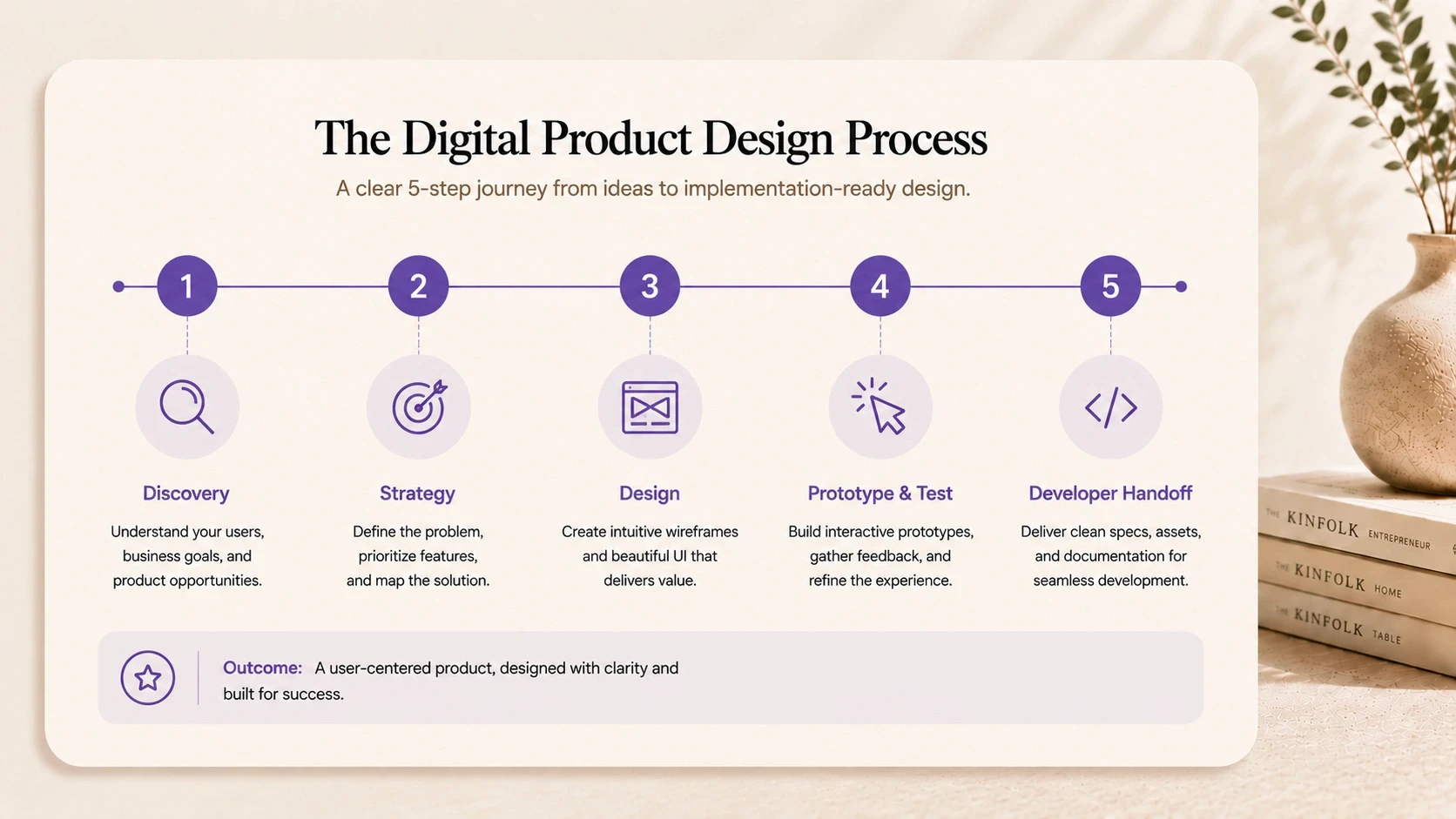
Phase 1: Discovery and Strategy (Weeks 1-2)
The product design process must always start with discovery. You simply cannot design a solution if you do not understand the problem first.
During these first two weeks, your design team acts like business detectives. They will ask you a lot of hard questions. They will dig deep into your revenue model. They want to know exactly how you plan to make money.
They also want to know what keeps your target users awake at night. This phase requires heavy involvement from you.
The Stakeholder Interviews
First, the agency team talks to your internal experts. We call these people the stakeholders.
This might include your CEO, your lead sales rep, or your customer support manager. The design team asks about long-term business goals. What does ultimate success look like in six months? What is the main pain point this software solves?
These interviews are crucial. They ensure the design team does not build something your company cannot actually support technically or financially.
Market and Competitor Hunting
Next, the team looks completely outside of your company. They analyze your biggest competitors.
They download similar apps in your industry. They do not do this to copy other people's work. They do this to find glaring gaps in the market.
If every competitor has a terrible, confusing checkout process, your team will document that. They will ensure your checkout process feels like magic. This research provides a solid baseline for current industry standards.
Defining the MVP Features
You cannot build every single feature you dream of all at once. In the discovery phase, you must learn to prioritize.
The team will help you define your Minimum Viable Product (MVP). First, you will list out every single dream feature. Then, you will aggressively cut that list down.
You will isolate the absolute core features needed just to launch. This discipline keeps the project focused. It keeps the timeline short. It ultimately saves you a massive amount of cash.
Phase 2: UX Research and Architecture (Weeks 3-4)
Now that the business strategy is clear, the focus shifts to the user. This is where the actual User Experience (UX) work begins.
During weeks three and four, the team maps out the bare skeleton of your app. There are absolutely no colors yet. There are no logos or pretty images. The focus is purely on logical structure.
How does a user get from the home page to the final payment screen? How many clicks does that action take? This phase requires intense, logical problem-solving.
Creating Empathy Personas
Who exactly is going to use this product? The team creates user personas to answer this question clearly.
A persona is a fictional character. It represents your ideal, perfect customer. For example, "Delivery Driver Dave" might be a 25-year-old worker who values extreme speed and big buttons. "Accountant Alice" might be a 45-year-old manager who needs complex data tables.
The team designs specifically for these imagined people. They create empathy maps to understand what these users think, feel, and struggle with daily.
Information Architecture (The Map)
Information Architecture is just a fancy industry term for organizing content.
Think of it exactly like a map of a grocery store. You want the milk placed near the eggs. You want all the related items grouped together logically.
In digital design, this means organizing your app's screens. The team creates a visual sitemap. They decide what options go in the main navigation bar. They decide what gets hidden in a settings menu. Good architecture means users never feel lost inside your app.
Drawing the Wireframes
Next comes the wireframing stage. Wireframes are very simple, black-and-white sketches of your app screens.
They show where the text blocks will go. They show where the buttons will sit. They purposefully exclude any design details. This forces everyone in the room to focus only on the layout and the logic.
You will review these rough wireframes. You will give your honest feedback. It is very easy and cheap for the team to move simple boxes around at this early stage.
Phase 3: UI Design and Visuals (Weeks 5-7)
This is the phase everyone looks forward to. This is where your abstract product finally comes to life visually.
The User Interface (UI) design phase takes those boring black-and-white wireframes and makes them stunning. The design team applies color psychology. They choose the perfect typography. They draw custom icons.
During this part of the digital product design timeline, the emotional connection is forged.
Building the Visual Identity
If your company already has a brand book, the team will use it. If you do not have one, they will help you create a visual identity from scratch.
They will present you with mood boards. A mood board is a curated collection of colors, fonts, and inspirational images. It shows the general "vibe" of the future app.
You might want a dark, sleek, and highly premium look. Or, you might want a bright, playful, and friendly look. You will approve this mood board before any actual screen design begins.
The High-Fidelity Mockups
Once the visual style is fully approved, the magic happens. The team applies this style to the wireframes. These are called high-fidelity mockups.
These mockups look exactly like the final, coded application. Every drop shadow is perfect. Every single button has the correct color gradient. The text is sized perfectly.
You will finally be able to see exactly what your customers will see on their actual smartphones.
Creating the Design System
A good product design services agency does not just design random, disconnected screens. They build a robust design system.
Think of a design system like a box of Lego blocks. It is a library of reusable digital components. It contains the exact rules for how a primary button must look. It holds the exact code snippets for your text styles.
This system ensures perfect consistency. If your app has 50 different screens, the design system guarantees the buttons look identical on every single page. It also makes future updates incredibly fast.
Phase 4: Prototyping and User Testing (Week 8)
Looking at flat, beautiful images is nice. However, software is meant to be interactive. Phase 4 brings real motion to your design.
The team links all the high-fidelity mockups together using advanced software like Figma. They create a fully clickable prototype.
When you click a "Login" button on the screen, it actually takes you to the dashboard screen. This prototype simulates the real app experience flawlessly.
The Power of Clickable Prototypes
The clickable prototype is the ultimate business testing tool. It feels exactly like a real app, but it has zero actual code behind it.
You can load this prototype directly onto your smartphone. You can tap through the menus yourself. You can experience the smooth transitions and animations.
This is always a thrilling moment for any founder. It makes the raw idea feel incredibly real. It is also the absolute best tool to show to potential investors if you are trying to raise capital.
Conducting Usability Testing
Now, the agency puts the prototype in front of real, unbiased users. This is called usability testing.
They will ask a random user to complete a specific task. For example, "Try to reset your account password using this prototype." The team watches them silently.
They see where the user gets confused. They notice when the user clicks the wrong button. This uncovers hidden, dangerous flaws in the UX design.
The Iteration Loop
Testing always reveals problems. This is actually a wonderful thing. It is much better to find a logic problem now than after you launch the app.
The design team takes all the raw feedback from the usability tests. They go back to the drawing board. They make quick adjustments.
They might make a tiny button much bigger. They might change a confusing headline. They iterate on the design over and over until the user can complete their tasks with absolutely zero friction.
Phase 5: Developer Handoff (Weeks 9-10)
The product design process does not magically end when the pictures look pretty. The design must now be translated into actual code.
Phase 5 is known as the developer handoff. This is a highly critical bridge. If the handoff is sloppy, the developers will build the wrong thing entirely. The final product will look nothing like the beautiful mockups you just approved.
A professional design team prepares detailed, technical files. They communicate constantly with the engineering team.
Redlining and Asset Export
The designers prepare specific, technical files for your developers.
They export all the custom icons in the correct web formats. They compress and export all the background images. They also provide something called "redlines."
Redlining is the process of showing the exact pixel spacing between elements. It tells the developer, "This blue button must sit exactly 24 pixels below this text block." Modern tools make this process very smooth, but it still requires human oversight.
Design Quality Assurance (QA)
Even with a perfect handoff file, developers sometimes make visual mistakes. They might accidentally use the wrong shade of blue. They might make a font slightly too small.
Design QA happens after the developers actually start writing code. The design team reviews the staging version of the coded app.
They compare the live code directly to the original Figma mockups. They create a strict list of visual bugs. The developers must fix these bugs before the app goes live to the public.
The Anatomy of a Product Design Team
A single freelancer rarely handles an entire digital product design timeline successfully. It takes a specialized, multi-disciplinary team to do it right.
Different phases require completely different types of thinking. Research requires deep analytical skills. UI design requires strong visual and artistic talent.
When you hire a top-tier agency, you get immediate access to a full roster of talent.
The Key Players Explained
Here is a simple table breaking down the key players you need on your project team.
Team Role | Core Responsibility | The Key Deliverables |
Product Strategist | Business alignment, MVP planning | Strategy Brief, Roadmaps |
UX Researcher | Understanding the user, testing | Personas, Empathy Maps |
UX Designer | Logic, flow, structure | Wireframes, Sitemaps |
UI Designer | Visuals, branding, aesthetics | Mockups, Design System |
UX Writer | Clear, concise app text | Button copy, Error messages |
The Strategist and The Writer
The strategist is your ultimate business partner. They care deeply about your return on investment. They do not care about button colors. They care about market fit and revenue.
The UX writer is equally vital. They write the actual text inside the app. Bad text confuses users instantly. A great UX writer ensures every single headline, button, and error message is crystal clear.
How CREATEXP Elevates Product Design Services
Finding the right partner for your project is stressful. You want an agency that moves fast, but you cannot afford sloppy, rushed work.
This is exactly why we built CREATEXP. Based in Bangalore, India, we are a design and development studio built specifically for modern founders. We have partnered with over 50 clients across five different continents.
We know exactly what it takes to build products that drive real business growth.
Focused, 100% In-House Teams
Many famous agencies secretly outsource your design work to cheap freelancers. We absolutely refuse to do this.
At CREATEXP, our entire creative team is in-house. Our strategists, UI designers, and developers sit right next to each other. They collaborate constantly.
This eliminates massive communication gaps. It ensures your project moves swiftly from strategy, directly into design, and finally into development. There is no hidden chaos. There are no unnecessary layers of management.
Designing for Real Outcomes
We love beautiful design. We are completely obsessed with perfectly aligned pixels. However, beauty is not our primary metric for success.
We design for measurable outcomes. Whether you need a conversion-focused website to raise venture capital, or a complex MVP to validate a new market in 30 days, we focus purely on your business goals.
We build things that actually work. We build things that scale rapidly. We stay deeply invested in your relationship long after the project goes live.
Common Roadblocks (And How to Dodge Them)
Let us be completely honest with you. The product design process is rarely perfect. Unexpected challenges will pop up.
Knowing what to expect helps you avoid massive project delays. Surprisingly, many founders accidentally slow down their own projects. They change their minds too often. They ask too many people for opinions.
By understanding these common roadblocks, you can keep your timeline strictly on track.
The Danger of Scope Creep
Scope creep is the ultimate enemy of a fast product launch. It happens when you constantly add new feature requests during the design phase.
You might suddenly decide your simple food delivery app needs a complex social media feed. The design team has to stop everything. They have to rethink the architecture. They have to draw brand new wireframes.
This easily adds weeks to your timeline. To dodge this trap, stick ruthlessly to your original MVP plan. Save all the "cool" extra features for version 2.0.
The "Make It Pop" Feedback Loop
Design is highly subjective. Everyone has a personal opinion on color.
If you ask your entire 20-person company to review a UI mockup, you will get 20 completely conflicting opinions. One person hates blue. Another person wants the logo bigger. Someone else just says, "Make it pop more."
This causes endless, painful revision loops. To fix this, appoint a single decision-maker for your company. The design agency should only take final, approved feedback from this one person.
Measuring the Success of Your New Design
How do you actually know if your product design services worked? You cannot just ask people if they "like" the new look. You need hard, undeniable data.
After your digital product launches, you must track specific performance metrics. Good design directly impacts these numbers. If the design team did their job well, these metrics will improve rapidly.
The Core UX Metrics
Here is a table showing exactly what you should measure immediately post-launch.
Success Metric | What It Actually Measures | Why It Matters to You |
Task Success Rate | Can users complete a specific action? | High rates prove the UI is highly intuitive. |
Time on Task | How long does an action take? | Lower times mean less friction in the UX. |
User Retention | Do users come back after day one? | High retention proves the app provides real value. |
Conversion Rate | How many users buy or sign up? | Directly tied to your revenue and growth. |
Support Tickets | How many users ask for help? | Fewer tickets mean the design is easy to understand. |
Tracking User Behavior
You must use analytics tools to watch how real people use your app. Look closely at heatmaps. See exactly where people click the most.
If users are constantly clicking on a shape that is not actually a button, your UI is confusing them. If users always abandon their shopping cart on the final shipping page, your UX has a critical flaw right there.
You must constantly monitor these behaviors to improve the product over time.
The Golden Nuggets: Key Takeaways
We shared a massive amount of information today. If you only remember a few key things before hiring an agency, remember these points.
Research comes first. Never skip the user research phase. Guessing what users want is the fastest way to burn your startup budget.
Wireframes save money. Making changes to simple sketches is incredibly cheap. Changing coded software is an expensive nightmare.
Timelines vary wildly. A simple mobile app MVP might take six weeks. A complex enterprise ERP system could take four months.
Testing is mandatory. You are not your user. Real, unbiased users must click your prototypes before you write any code.
Keep your team small. Appoint one main decision-maker on your side to prevent endless feedback loops.
Burning Questions Answered (FAQ)
Founders always ask us these specific questions during our discovery calls. We wanted to answer them clearly for you here.
What is the main difference between UX and UI design?
UX (User Experience) is about pure logic and structure. It focuses on how the app works. UI (User Interface) is about aesthetics. It focuses on how the app looks, including colors and typography. They must work perfectly together.
Do I really need a clickable prototype?
Yes, absolutely. A clickable prototype lets you experience the app before writing expensive code. It is the cheapest way to find logic errors. It is also the best tool for pitching to investors.
Can we speed up the digital product design timeline?
Yes, but only by reducing the project scope. If you need a faster launch, you must cut features. Attempting to design a massive app in a tiny timeframe always results in sloppy work.
Will my company own the final design files?
When you work with a reputable agency like CREATEXP, yes. Once the project is complete and paid for, you receive full legal ownership of the Figma files and all exported assets.
Do product design services include coding the app?
Technically, product design ends at the developer handoff. However, full-service studios like CREATEXP offer both design and development completely under one roof.
Warning: Working With Us May Trigger Unstoppable Momentum