
E-commerce Development
Trehan Sangpriya
CEO & Co-Founder

You've built the product. The website looks great. The inventory is set up. And then someone asks: "How are customers actually going to pay?" That's when you realise the payment layer is its own entire project. Not because it has to be complicated, but because most guides either oversimplify it or go so deep into code that non-developers tune out completely.
This guide is for founders, developers, and e-commerce teams who want a clear, practical understanding of payment gateway integration, what it is, how it actually works, which gateway is right for your business, and what the integration process looks like from brief to live. No fluff, no unnecessary technical jargon.
Here's the context that frames why this matters so much. Baymard Institute research shows that 17% of online shoppers abandon their cart specifically because of a complicated or untrustworthy checkout process. Another study by Stripe found that optimising the checkout experience, including payment method availability and form design, can improve conversion rates by up to 10.5%. Payment gateway integration isn't just infrastructure. It's a direct revenue lever.
Let's get into it.
What Is a Payment Gateway and How Does It Work?
Before talking about integration, you need a clear mental model of what a payment gateway actually does. A lot of people confuse gateways with payment processors, with merchant accounts, and with payment service providers. These are related but different things.
A payment gateway is the technology that securely captures and transmits payment information between your customer, your website, and the financial system. Think of it as the digital version of a card reader at a physical store.
Here's what happens in a typical e-commerce payment transaction:
Customer enters card details at checkout
Gateway encrypts the data and sends it to the payment processor
Processor sends the transaction to the card network (Visa, Mastercard)
Card network routes the request to the customer's issuing bank
Bank approves or declines and sends a response back through the chain
Gateway receives the response and communicates it to your store in real time
If approved: payment is captured and the order confirms
This entire process happens in 2–3 seconds. From the customer's perspective, they clicked "Pay Now" and it worked. Behind that single click is a multi-party financial infrastructure routing information through several systems simultaneously.
The difference between a gateway and a payment processor: A payment processor handles the actual movement of money between banks. A payment gateway handles the secure transmission of data. Many modern payment service providers (like Stripe or Razorpay) bundle both functions into a single integration, which is why the distinction is less visible today.
Types of Payment Gateway Integration
There are three main ways to integrate a payment gateway into your e-commerce store. Each one makes different trade-offs between user experience, control, and technical complexity.
Type 1, Hosted Payment Page (Redirect)
Your customer is redirected to the payment gateway's own page to complete the transaction. After payment, they're redirected back to your store.
Examples: PayU, PayPal Standard, older Razorpay checkout flows
Pros:
Simplest integration, minimal code required
PCI compliance is handled entirely by the gateway
No risk of sensitive card data touching your server
Cons:
Customer leaves your site to pay, higher abandonment risk
Less control over the checkout design and experience
Slower checkout flow due to redirects
Best for: Small stores or businesses prioritising simplicity over UX polish
Type 2, Embedded / Hosted Fields
The payment form stays on your website, but the actual card input fields are served as iframes from the gateway. Card data never touches your server.
Examples: Stripe Elements, Razorpay Drop-In UI, Braintree Hosted Fields
Pros:
Seamless checkout experience, customer never leaves your site
Full visual control over the checkout design
PCI compliance remains with the gateway
Modern, professional feel
Cons:
More technical setup than redirect
Gateway constraints on field customisation (though usually quite flexible)
Best for: Most modern e-commerce stores wanting a clean, on-site checkout
Type 3, Direct API Integration
Your server receives and processes card data directly, sending it via API to the gateway. Full control, but full responsibility.
Pros:
Maximum control over every aspect of the payment flow
Can build fully custom checkout experiences
Cons:
Requires PCI DSS Level 1 compliance, a significant security and audit requirement
Only appropriate for businesses with the technical resources to handle it
High liability if card data is compromised
Best for: Large enterprises with dedicated security teams and compliance infrastructure
The practical recommendation for most businesses: Stripe Elements or Razorpay Drop-In UI gives you a near-seamless on-site checkout with gateway-handled PCI compliance. This is the sweet spot of UX quality, security, and implementation speed.
Choosing the Right Payment Gateway for Your Business
Not all gateways are equal. The right one depends on where you're selling, what currencies you need, what payment methods your customers expect, and what your transaction volume looks like.
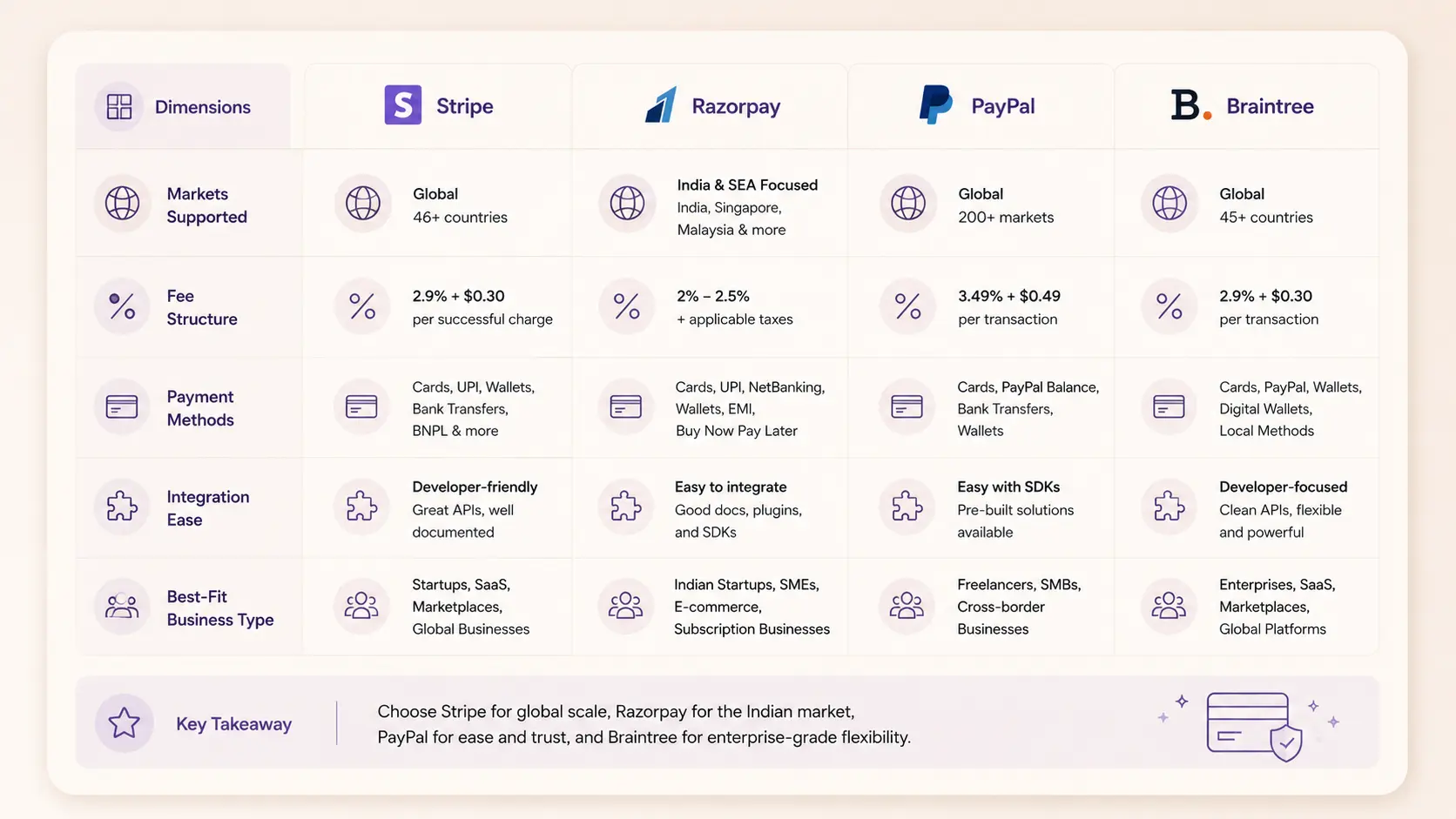
Stripe, Best for Global and Tech-Forward Businesses
Stripe is the gold standard for developer experience in payment gateway integration. The documentation is exceptional, the API is clean and well-designed, and the ecosystem is extensive (Stripe Billing, Stripe Connect for marketplaces, Stripe Radar for fraud detection).
Fee structure: 2.9% + $0.30 per transaction (no monthly fee on standard plans)
Markets: Available in 47+ countries
Best for: Global businesses, SaaS products, startups, tech-first teams
Standout features: Stripe Elements, Stripe Checkout (hosted page), billing subscriptions, marketplace payouts (Stripe Connect)
One important note: Stripe doesn't natively support India or some other emerging markets for direct transactions. For India-based businesses, Razorpay is typically the better primary choice.
Razorpay, Best for Indian Market
Razorpay is the dominant payment gateway for India and has become the default recommendation for any Indian business or any business selling to Indian customers.
Fee structure: 2% per transaction (varies by payment method)
Markets: India-first, expanding to Southeast Asia
Best for: Indian e-commerce, D2C brands, SaaS with Indian customers, startups in India
Standout features: UPI integration, support for 100+ payment methods, Razorpay Payment Links, subscription billing, multi-currency support
The breadth of payment methods Razorpay supports is significant in the Indian context: credit and debit cards, UPI (the dominant payment rail in India), net banking, wallets (Paytm, PhonePe), EMI options. A store that only accepts cards is leaving a large percentage of Indian shoppers unable to complete their purchase.
PayPal, Best for Global Trust Signal
PayPal is less used as a primary gateway in 2026 and more used as a trust signal and alternative payment method, particularly for older demographics and international customers who prefer it. Offering PayPal alongside your primary gateway often increases conversion for these segments.
Braintree, Best for Scale
Braintree (owned by PayPal) is enterprise-grade and well-suited for high-volume businesses and marketplaces that need customisation beyond what Stripe's standard plans offer.
Gateway | Best Market | Transaction Fee | PCI Handling | Ideal For |
Stripe | Global | 2.9% + $0.30 | Yes (Stripe.js) | Tech-first, global SaaS |
Razorpay | India | ~2% | Yes (Drop-in) | Indian market, all payment methods |
PayPal | Global | 3.49% + fixed | Yes | Trust signal, global customers |
Braintree | Global | 2.59% + $0.49 | Yes | High-volume, enterprise |
Square | US/UK/AUS | 2.6% + $0.10 | Yes | Retail + online hybrid |
The Stripe Integration Process: Step by Step
Stripe is the most commonly integrated gateway in international e-commerce development. Here's what the integration actually involves.
Step 1, Account Setup and API Keys
Create a Stripe account and retrieve your API keys from the dashboard. You'll have:
Publishable key (used client-side in your frontend code)
Secret key (used server-side only, never expose this publicly)
Start in test mode. Stripe provides test card numbers that simulate different scenarios (successful payment, declined card, insufficient funds) without processing real money.
Step 2, Frontend: Stripe Elements
Install the Stripe.js library and mount Stripe Elements onto your checkout page. Elements creates secure iframe-based card input fields that look like part of your form but are served by Stripe. Card data never touches your server.
Step 3, Backend: Create a Payment Intent
When the customer initiates payment, your server creates a Payment Intent via Stripe's API. The Payment Intent represents the payment request and returns a client secret that the frontend uses to confirm the payment.
Step 4, Frontend: Confirm Payment
The frontend uses the client secret to call stripe.confirmCardPayment(). Stripe handles 3D Secure authentication if required by the card issuer. The result (success or failure) is returned to your frontend.
Step 5, Webhook: Handle Confirmed Payments
Set up Stripe webhooks to receive event notifications when payments are confirmed on Stripe's side. This is how your backend reliably knows a payment succeeded, more reliable than relying on the frontend callback alone. Update your order status and trigger fulfillment here.
Step 6, Test Everything
Use Stripe's test card numbers to simulate successful payments, declined cards, 3D Secure flows, and refund scenarios before switching to live mode.
The Razorpay Integration Process: Step by Step
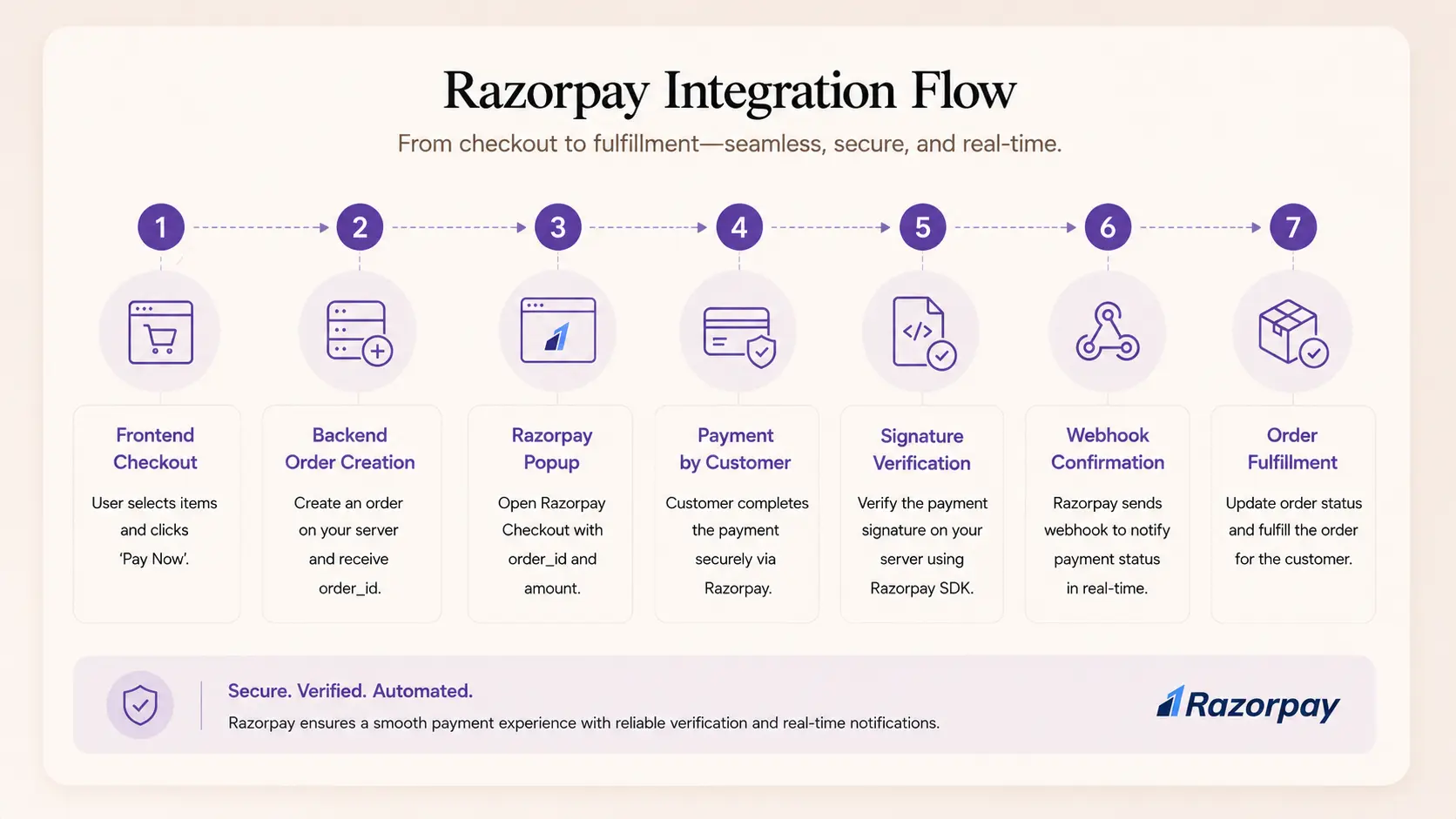
Razorpay's Drop-In UI approach makes integration quick for most e-commerce setups.
Step 1, Account and API Keys
Create a Razorpay account, complete KYC, and retrieve your Key ID and Key Secret from the dashboard.
Step 2, Create an Order (Backend)
When the customer initiates checkout, your backend creates a Razorpay Order via the API. This returns an order_id that the frontend uses to open the Razorpay checkout.
Step 3, Open Razorpay Checkout (Frontend)
Load the Razorpay JavaScript SDK and open the checkout popup with your order_id, key, amount, and currency. Razorpay handles the payment UI, supporting all configured payment methods (cards, UPI, wallets, net banking).
Step 4, Verify Payment (Backend)
After payment, Razorpay returns a razorpay_payment_id, razorpay_order_id, and razorpay_signature. Your backend must verify this signature using your Key Secret to confirm the payment is genuine and hasn't been tampered with. Never skip signature verification.
Step 5, Webhooks for Reliability
Configure Razorpay webhooks to receive payment success and failure events. This ensures your order system updates correctly even if the customer closes their browser mid-flow.
PCI DSS Compliance: What You Need to Know
Payment Card Industry Data Security Standard (PCI DSS) is the security framework governing how businesses handle cardholder data. If you're accepting card payments, you must comply.
The good news for most e-commerce stores: If you use hosted fields (Stripe Elements, Razorpay Drop-In), card data never reaches your server. This significantly reduces your compliance scope to PCI DSS SAQ A (the simplest self-assessment), which is a questionnaire rather than a full audit.
What you still need to do:
Use HTTPS (SSL certificate) across your entire store
Keep all software and plugins updated
Don't store card numbers or CVV codes anywhere in your system
Complete the appropriate SAQ annually (your gateway will guide you)
When does PCI compliance get more complex? If you store, process, or transmit raw card data on your own servers (direct API integration, Type 3 above), you move into SAQ D territory, which requires a formal external audit. This is why most businesses should stick with hosted field integrations.
PCI Security Standards Council SAQ documentation and compliance guide
Common Mistakes in Payment Gateway Integration
These are the errors that come up repeatedly, either in development or after launch.
No webhook verification. Relying solely on the frontend callback to confirm payment status. If the customer's browser closes after payment, the order never confirms. Always use webhooks.
Skipping signature verification (Razorpay). After payment confirmation, skipping the HMAC signature verification step. This means fraudulent payment confirmations can pass through.
Test mode in production. Shipping with test API keys still active. This means real customers are going through a payment flow that doesn't actually process money.
No idempotency keys (Stripe). Not using idempotency keys on payment API calls means a network timeout can result in duplicate charges.
No error handling for declined cards. Most checkout implementations handle the success path well but poorly communicate specific decline reasons to the user. A clear "Your card was declined, please try a different payment method" improves recovery significantly.
Missing 3D Secure handling. Not implementing the 3D Secure authentication flow correctly means transactions from European customers (where 3DS is mandatory under PSD2) will fail.
Currency display vs. actual charge currency mismatch. Displaying prices in one currency but charging in another without clear disclosure creates chargebacks and customer complaints.
How Createxp Approaches Payment Gateway Integration
Payment integration is one of those areas where cutting corners has immediate, visible consequences, failed transactions, security vulnerabilities, and customer complaints. Createxp builds payment integrations that are secure, reliable, and designed to convert.
The work starts before any code. The team maps the complete payment flows first: what payment methods does the target market use? What currencies? Are there subscription elements? Does the business need split payments (marketplace model)? Does the checkout need to support guest users and account holders differently? These questions determine the architecture before the first API call is made.
Here's how Createxp structures a payment integration:
Gateway Selection by Market The gateway recommendation comes from the business's market and customer base, not from which gateway is most popular. A D2C brand selling in India gets Razorpay. A SaaS product selling globally gets Stripe. A marketplace gets Stripe Connect or Razorpay Route. The wrong gateway is a recurring friction point, picking it correctly upfront matters.
Webhook-First Architecture Every payment integration Createxp builds uses webhooks as the authoritative source of truth for payment status. Frontend callbacks are used for UX (showing the customer a success screen) but the order management system only updates on verified webhook events. This eliminates the class of bugs where customers pay but orders don't confirm.
Security as a Baseline HTTPS everywhere. Signature verification on all payment confirmations. Test and live key separation enforced in environment configuration. Sensitive keys never hardcoded in frontend code or version control. These aren't optional extras, they're baseline requirements on every integration.
Test Coverage Before any integration goes live, the team tests every scenario: successful payment, card declined, insufficient funds, 3D Secure challenge, payment timeout, duplicate transaction attempt, refund flow. A payment integration that only works in the happy path is a liability.
Checkout Performance Payment integrations add JavaScript to your checkout page. Createxp monitors the load impact of gateway scripts and defers non-critical resources to ensure the checkout page stays fast. A slow checkout page loses customers before they even reach the payment form.
Createxp has integrated Stripe, Razorpay, and PayPal across e-commerce platforms, SaaS products, and custom marketplace applications. The pattern is consistent: a well-integrated payment gateway is invisible to customers and reliable to operators.
Payments That Work Are Payments That Convert
A checkout that's fast, trustworthy, and supports the payment methods your customers actually use is one of the highest-leverage investments you can make in your e-commerce business. Everything else on the page, the design, the copy, the product photography, is meaningless if the payment step fails.
Get the integration right once and it runs reliably for years.
Book a Free Technical Consultation
Key Takeaways
A payment gateway encrypts and transmits card data between your store and the financial system. Modern providers like Stripe and Razorpay bundle gateway and processor functions in a single integration.
For most e-commerce stores, embedded hosted fields (Stripe Elements, Razorpay Drop-In) is the right approach, on-site checkout experience with gateway-handled PCI compliance.
Stripe is the best choice for global e-commerce and tech products. Razorpay is the default for the Indian market, supporting UPI, wallets, net banking, and 100+ payment methods.
Webhooks are essential, not optional. Never rely solely on frontend callbacks to confirm payment status. Always verify payment on the server side via webhooks.
Using hosted field integrations (Stripe Elements, Razorpay Drop-In) keeps you in PCI DSS SAQ A scope, a self-assessment rather than a full audit.
The seven most common integration mistakes: no webhooks, skipping signature verification, test keys in production, no idempotency keys, poor error handling, missing 3D Secure handling, and currency mismatch.
Checkout conversion is directly affected by payment method availability. In India, a store that doesn't support UPI is excluding the dominant payment rail.
Frequently Asked Questions
What is payment gateway integration?
Payment gateway integration is the process of connecting your e-commerce website or application to a payment gateway service so customers can complete transactions. It involves implementing the gateway's JavaScript SDK on the frontend, connecting to the gateway's API on the backend, handling payment confirmations via webhooks, and ensuring the integration is secure and PCI compliant.
What is the best payment gateway for e-commerce?
It depends on your market. Stripe is the best payment gateway for global e-commerce and tech products, excellent developer experience, strong security, and available in 47+ countries. Razorpay is the best choice for India-based businesses, supporting UPI, net banking, wallets, and 100+ payment methods. For businesses selling globally, offering Stripe as the primary gateway and PayPal as an alternative covers most customer preferences.
How does Stripe integration work?
Stripe integration involves: creating a Stripe account and obtaining API keys, implementing Stripe Elements on your checkout page for secure card input, creating a Payment Intent on your backend when checkout begins, confirming the payment with the client secret on the frontend, and setting up webhooks to receive payment confirmation events. Stripe handles PCI compliance when using Stripe.js for card data capture.
How does Razorpay integration work?
Razorpay integration involves: creating a Razorpay account and completing KYC, creating an Order on your backend via the Razorpay API, opening the Razorpay checkout popup on the frontend with the Order ID, receiving the payment response containing payment ID, order ID, and signature, verifying the HMAC signature on your backend to confirm the payment is genuine, and setting up webhooks for reliable order confirmation.
Do I need PCI compliance for my online store?
Yes, but the scope depends on how you integrate. Using hosted field integrations like Stripe Elements or Razorpay Drop-In means card data never touches your server, placing you in PCI DSS SAQ A scope, a short self-assessment questionnaire. You must also use HTTPS across your store and keep all software updated. Full PCI audits are only required if you store or process raw card data directly on your server.
What is the difference between a payment gateway and a payment processor?
A payment gateway handles the secure transmission of payment data between the customer's browser and the financial system. A payment processor handles the actual movement of funds between banks. Modern services like Stripe and Razorpay function as both, bundling gateway and processing into a single integration, which is why the distinction is less important for most businesses building e-commerce today.
What is a webhook in payment integration?
A webhook is an HTTP endpoint on your server that the payment gateway calls when a payment event occurs, such as a successful payment, a failed transaction, or a refund. Webhooks are the most reliable way to update your order management system, because they're server-to-server and don't depend on the customer's browser staying open or the frontend callback succeeding. A payment integration without webhooks will have orders that don't confirm when customers close their browser after paying.
Warning: Working With Us May Trigger Unstoppable Momentum