
Web Development
Saket Khare
CTO & Co-Founder

You’re starting a new web project and someone on the team says “let’s use React.” Someone else says “shouldn’t we use Next.js?” And now you’re in a twenty-minute discussion where half the room isn’t entirely sure what the difference actually is. Sound familiar?
This comparison comes up constantly, in job interviews, in project kickoffs, in architecture discussions. The confusion makes sense, because Next.js is built on React. They’re not competing technologies. One is a foundation, the other is a framework built on top of that foundation. But the choice between them has real consequences for your project’s performance, SEO, developer experience, and scalability.
Here’s the usage context that matters: React is used on over 14 million websites worldwide and is the most popular JavaScript library for building user interfaces. Next.js, built by Vercel, powers some of the most high-traffic sites on the internet, including Hulu, Twitch, GitHub’s marketing site, and TikTok’s web presence. Understanding when to use each isn’t just a technical question, it’s a product decision.
This guide gives you the honest, practical breakdown of Next.js vs React, what each one is, what each one isn’t, and when each one makes sense for your specific project.
First: Understanding the Relationship
Before comparing them, you need to understand what they actually are. This is where most explainers get muddled.
⚛️ React Gives you: • A component model for building modular UI • A virtual DOM for efficient UI updates • State management within components • JSX syntax for writing HTML-like structures in JavaScript Does NOT include: • Routing (you need React Router or similar) • Server-side rendering • API routes or backend capability • A build configuration • Image optimisation • SEO management | 🗳️ Next.js Gives you: • File-based routing (folders become URL routes) • Server-side rendering (SSR) • Static site generation (SSG) and ISR • API routes (backend endpoints built in) • Built-in image optimisation • Automatic code splitting • Edge and middleware support • TypeScript support out of the box Does NOT include: • React knowledge is required first • More initial setup complexity |
React is deliberately minimal. It solves the UI layer and leaves everything else to you or to libraries you choose. That flexibility is both its strength and the reason every React project ends up with a different set of dependencies.
Next.js is React plus a full application architecture. Every Next.js app is a React app. Not every React app is a Next.js app. That distinction matters.
The Core Technical Differences
Understanding what each one does is one thing. Understanding how those differences affect your real project is another.
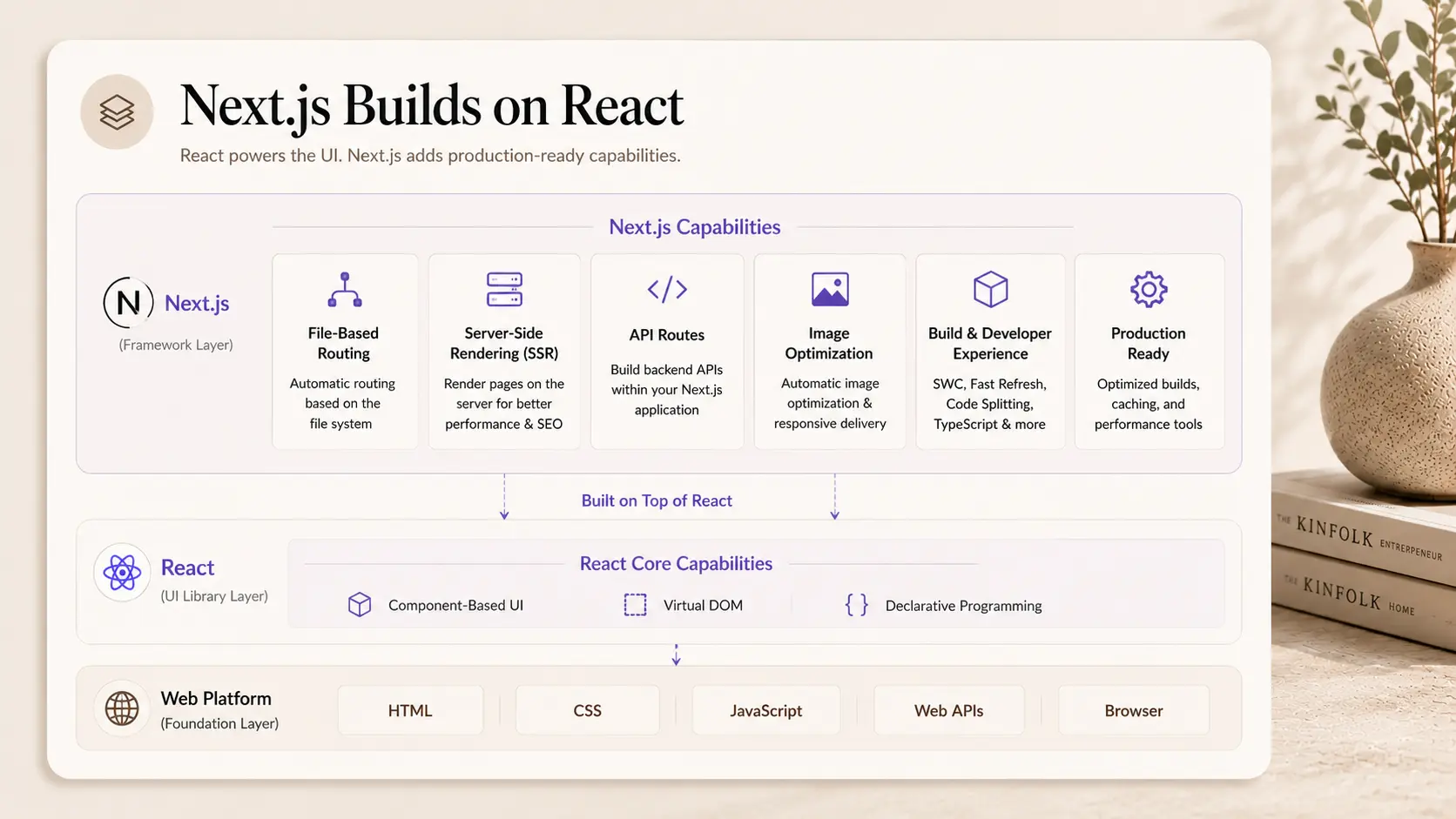
Rendering: The Most Important Difference
This is where the practical gap between React and Next.js is most significant.
React (default): Client-Side Rendering (CSR). The browser downloads a mostly empty HTML file and a large JavaScript bundle. JavaScript runs in the browser, fetches data, and renders the page. The user sees a loading state before content appears.
Next.js: Multiple rendering options, chosen per page.
Rendering Method | What It Does | Best For |
CSR (Client-Side) | Browser renders, same as React | User dashboards, authenticated pages |
SSR (Server-Side) | Server renders HTML on each request | Dynamic pages that change per user |
SSG (Static) | HTML generated at build time | Marketing pages, blogs, documentation |
ISR (Incremental) | Static pages that revalidate on a schedule | E-commerce products, frequently updated content |
This rendering flexibility is the biggest practical advantage of Next.js. The right rendering method for each page dramatically affects performance and SEO.
Routing
React: No built-in routing. You install React Router (or a similar library) and configure it manually. This is additional code, additional configuration, and another dependency to maintain.
Next.js: File-based routing built in. Create a file at /pages/about.tsx and /about is automatically a route. App Router (Next.js 13+) extends this with layouts, loading states, and nested routing built into the folder structure.
API Routes
React: Cannot serve API endpoints. You need a separate backend, Node.js, Express, a serverless function service, or a separate API service entirely.
Next.js: API routes are built in. Create a file at /pages/api/users.ts and you have a serverless API endpoint. For many projects, this eliminates the need for a separate backend service.
SEO and Performance
React (CSR): Search engines see an empty HTML page and must wait for JavaScript to execute before indexing content. Google handles this better than it used to, but it’s still slower and less reliable than server-rendered HTML.
Next.js: Pages rendered on the server (SSR) or at build time (SSG) deliver fully formed HTML to search engine crawlers immediately. This is a significant SEO advantage for public-facing pages.
Next.js vs React: The Real-World Comparison
Let’s get concrete about when each choice makes sense.
Factor | React | Next.js |
Learning curve | Lower | Medium (React knowledge required first) |
SEO capability | Limited (CSR only) | Excellent (SSR, SSG, ISR) |
Performance | Depends on configuration | Optimised by default |
Routing | Third-party required | Built-in file-based |
API backend | Separate service needed | Built-in API routes |
Full-stack capability | No | Yes |
Build configuration | Manual | Mostly handled |
Time to production | Slower (more setup) | Faster (conventions built in) |
Community size | Massive | Large and growing fast |
When to Use React Without Next.js
There are legitimate use cases where plain React is the better choice. Here’s where it makes genuine sense.
🔐 Is the entire app behind authentication? SaaS dashboards, admin panels, and internal tools don’t need SEO. Every page is private. Server-side rendering provides no benefit for unauthenticated users because there are none. React with React Router is perfectly appropriate here. → Use: React (without Next.js) |
📚 Are you learning frontend development? Learn React first. Next.js adds conventions and abstractions that are genuinely harder to understand without a solid React foundation. Master components, state, hooks, and data fetching in the browser before graduating to Next.js. → Use: React (without Next.js) |
🔧 Do you have a strong existing backend? If your team already has a Django API, Laravel application, or Ruby on Rails backend, Next.js’s built-in API routes are less useful. React as a purely frontend library integrates cleanly with any existing API without the overhead of a full framework. → Use: React (without Next.js) |
When to Use Next.js
Next.js is the right choice for the majority of new web application projects. Here’s where it specifically earns its place.
🔍 Does your website need to be found on Google? Marketing sites, product landing pages, blogs, e-commerce stores, if search rankings matter, Next.js is the clear choice. SSG and SSR deliver fully formed HTML to crawlers. React’s CSR can be optimised for SEO, but Next.js handles it by default. → Use: Next.js |
⚡ Is performance a business requirement? Next.js’s automatic image optimisation, code splitting, prefetching, and edge deployment make it significantly faster out of the box than a custom React setup. For applications where load speed directly affects conversion rates, this is not optional. → Use: Next.js |
💡 Do you want full-stack in a single codebase? Next.js API routes allow you to build frontend and backend in a single project. For teams that want JavaScript end-to-end without managing separate services, this is genuinely valuable, especially for early-stage products. → Use: Next.js |
🏗️ Does your app have both public and private pages? Most real applications have a mix: public marketing pages, auth pages, and private dashboards. Next.js handles all three rendering modes in a single framework. Static-generate the marketing pages, server-render authenticated content, and client-render real-time dashboard components. → Use: Next.js |

The Performance Gap Is Real
This is the part most comparison articles understate. The performance difference between a well-built Next.js application and a standard React SPA is significant, especially on mobile.
A React SPA sends a minimal HTML shell and loads the entire JavaScript bundle before rendering anything. On mobile with a 4G connection, this can mean 2–4 seconds before a user sees content.
A Next.js page with SSG sends fully rendered HTML immediately. The browser starts displaying content before JavaScript has even loaded. This directly affects Core Web Vitals scores, Google rankings, and user conversion rates.
For context: Google’s research shows that a 1-second improvement in mobile load time increases conversions by up to 27% for retail sites. The rendering approach is not a theoretical performance concern, it’s a business metric.
Does Next.js Have Any Downsides?
Honest answer: yes, a few.
More complex mental model. Understanding when to use SSR vs SSG vs ISR vs CSR requires genuine architectural thinking. React’s CSR model is simpler because there’s only one option.
Vendor lean toward Vercel. Next.js is built by Vercel. It runs on any Node.js server, but some features work best on Vercel’s infrastructure. This creates a soft vendor dependency.
Overkill for small projects. If you’re building a simple single-page app that doesn’t need SEO or server-rendered content, Next.js adds conventions you won’t use.
More opinionated. Next.js makes decisions for you, about routing, file structure, and how API routes work. That’s a feature for most projects, but it’s a constraint for teams with strong alternative preferences.
None of these are dealbreakers for most projects. But they’re honest trade-offs worth knowing.
How Createxp Uses Next.js and React
At Createxp, the choice between Next.js and React isn’t theoretical, it’s made fresh on every project based on what the product actually needs.
The default recommendation for most new web projects is Next.js. The rendering flexibility, the built-in performance optimisation, and the full-stack capability make it the right starting point for almost everything public-facing. That’s not a blanket rule, it’s the result of watching how both approaches perform in production.
Is the project public-facing with SEO requirements?
Next.js. Static generation for pages that don’t change frequently (marketing, blog, docs). Server rendering for pages that need real-time data or personalisation. The answer is clear for any site where search visibility matters.
Is the entire application behind authentication?
React without Next.js is a valid option, especially for internal tools and SaaS dashboards where SEO is irrelevant. The team evaluates this on the specifics: team familiarity, backend stack, and whether any future public-facing pages are planned.
Does the project need full-stack capability?
Next.js API routes eliminate the need for a separate backend service for many early-stage products. For a founder building their first SaaS product, this simplification has real value, one deployment, one codebase, one technology to understand.
What’s the team’s existing knowledge?
A team deep in pure React can produce faster results on a plain React project than on a Next.js project they’re learning simultaneously. Createxp factors this in, the best technology choice is the one your team can execute well, not the one that’s theoretically optimal.
The performance work doesn’t stop at the framework choice, either. Createxp builds with Core Web Vitals targets set in the brief, not measured as an afterthought after launch. Whether it’s Next.js or React, pages are built to load fast, render correctly, and score well on the metrics that affect business outcomes.
The Right Tool Is the One That Fits Your Project Not sure which is right? 30 minutes with someone who’s built both can save weeks of rework. |
Key Takeaways
Next.js is built on React. Every Next.js app is a React app. The comparison isn’t React vs. Next.js, it’s React alone vs. React with a full framework.
The biggest practical difference is rendering: React defaults to client-side rendering, while Next.js supports SSR, SSG, ISR, and CSR on a per-page basis.
For public-facing websites and applications where SEO matters, Next.js is the clear choice. Server-rendered and statically generated pages significantly outperform CSR React in search rankings and Core Web Vitals.
React without Next.js is the right choice for fully authenticated applications (SaaS dashboards, admin panels, internal tools) where SEO doesn’t apply.
Next.js API routes allow full-stack development in a single codebase, eliminating the need for a separate backend for many projects.
The performance gap is real and measurable, Next.js applications consistently score higher on Core Web Vitals, which directly affects Google rankings and conversion rates.
Learning Next.js before having a solid React foundation is a common mistake. Master React fundamentals first, then graduate to Next.js.
Frequently Asked Questions
What is the difference between Next.js and React?
React is a JavaScript library for building user interfaces. It handles the UI layer and renders in the browser by default. Next.js is a framework built on React that adds server-side rendering, static site generation, file-based routing, API routes, image optimisation, and more. Every Next.js application uses React internally. Not every React application uses Next.js.
Should I learn React or Next.js first?
Learn React first. Next.js adds abstractions and conventions on top of React that are harder to understand without a solid foundation in React components, hooks, state, and data fetching. Most developers should spend at least several weeks building with plain React before moving to Next.js.
Is Next.js better than React for SEO?
Yes, significantly. Next.js supports server-side rendering (SSR) and static site generation (SSG), which deliver fully formed HTML to search engine crawlers. React’s default client-side rendering sends a mostly empty page to crawlers, requiring JavaScript execution before content is visible. For any public-facing website where search rankings matter, Next.js has a clear SEO advantage.
When should I use React without Next.js?
Use plain React when your entire application is behind authentication (like a SaaS dashboard or internal tool), when you’re integrating a React frontend with an existing backend API, when you’re learning React for the first time, or when you’re building a small interactive component embedded in an existing site.
What are the benefits of Next.js over React?
The main Next.js benefits over plain React are: multiple rendering modes for performance and SEO, built-in file-based routing, API routes for full-stack development, automatic image optimisation, automatic code splitting, TypeScript support out of the box, and significantly better Core Web Vitals scores by default.
Is Next.js harder to learn than React?
Next.js has a higher learning curve than React, partly because understanding when to use each rendering mode (SSR, SSG, ISR, CSR) requires solid conceptual understanding. The App Router model in Next.js 13+ adds layout conventions and error boundaries that take time to learn. React is the better starting point before graduating to Next.js.
Does Next.js require a Node.js server?
For SSR and API routes, yes, Next.js requires a Node.js server environment or a serverless function platform (like Vercel, AWS Lambda, or Netlify Functions). Static site generation (SSG) pages can be deployed to any static host, including CDN-only services. The hosting requirement depends on which rendering modes you use.
Warning: Working With Us May Trigger Unstoppable Momentum