
Web Development
Saket Khare
CTO & Co-Founder
You didn’t come here for a generic “here’s what SaaS means” article. You’ve got an idea, maybe a wireframe, maybe a Notion doc full of features. And now you’re trying to figure out how to actually build the thing. What stack do you use? How long will it take? Who do you need on your team? What will break if you get it wrong early?
Good. Those are exactly the right questions.
SaaS is eating the world, and the numbers back that up. The global SaaS market was valued at over $270 billion in 2023 and is expected to cross $1 trillion by 2032. But here’s the part most people gloss over: the majority of SaaS products that fail don’t fail because of a bad idea. They fail because of poor technical decisions made in the first 90 days. The wrong stack, bloated scope, or building without a clear architecture plan, these are quiet killers.
So this guide is built to save you from those mistakes. Whether you’re a non-technical founder trying to understand what your dev team is building, or a technical founder who wants to sanity-check your approach, this is for you.
What Makes SaaS Web Development Different From a Regular Website
This is something a lot of founders don’t fully appreciate until they’re knee-deep in development. Building a SaaS product is not the same as building a marketing website, or even a standard web app. The complexity is different. The stakes are higher.
Here’s why:
• Multi-tenancy, your app needs to serve multiple customers from the same codebase, while keeping their data completely separate
• Authentication & access control, different user roles, permissions, team accounts, and SSO
• Billing and subscription management, trial periods, plan upgrades, failed payments, invoices
• Scalability, the system needs to handle 10 users and 10,000 users without a full rebuild
• Uptime expectations, your customers depend on your product to run their business. Downtime costs you churn.
A marketing site can go down for an hour without much damage. A SaaS product going down means your customers can’t work. That changes how you design, build, and host everything.
The Core Architecture You Need to Understand
Before you touch a line of code, you need to understand what you’re building at a structural level.
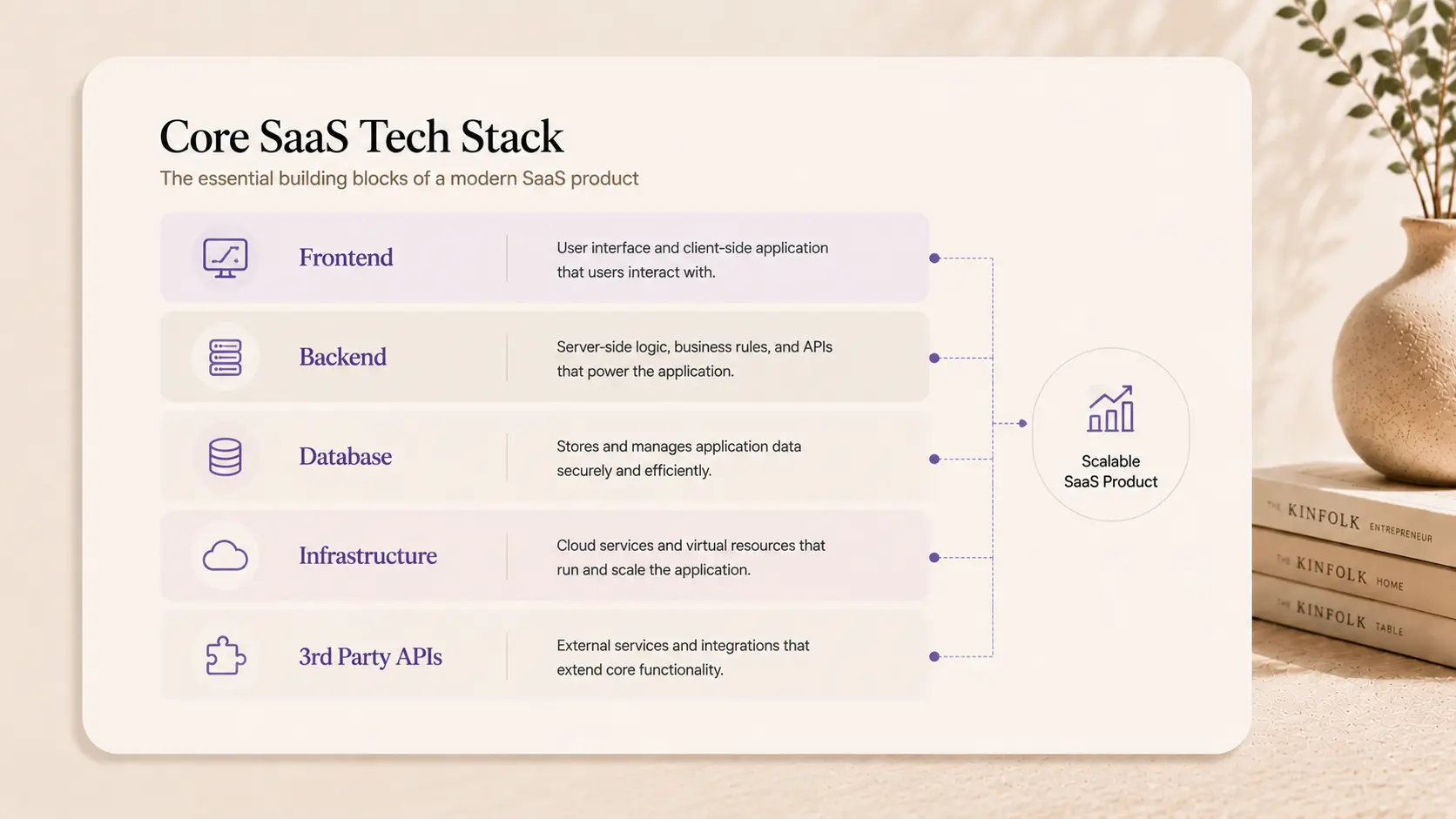
Every SaaS product has three main layers:
1. Frontend, what users see and interact with (the UI)
2. Backend, the server-side logic, database, and APIs
3. Infrastructure, how and where everything runs (hosting, scaling, security)
Getting these three layers right from the start saves enormous pain later. Trying to bolt scalability onto a system that wasn’t designed for it is like renovating a house’s foundation after the walls are up.
Choosing the Right SaaS Tech Stack
The most common question in SaaS product development is: what tech stack should I use? Honestly, there’s no single right answer. But there are very clear wrong answers, and that’s what we’re going to help you avoid.
Frontend: What Your Users Actually See
Your frontend is your product’s first impression. For SaaS, it needs to be fast, responsive, and component-driven. Here are the most common choices:
Framework | Best For | Learning Curve |
React.js | Most SaaS products, large ecosystems | Medium |
Next.js | SEO-sensitive SaaS, fast load times | Medium |
Vue.js | Smaller teams, simpler apps | Low–Medium |
Angular | Enterprise SaaS, strict structure | High |
The honest recommendation? React or Next.js covers 80% of SaaS use cases. Next.js in particular is excellent for SaaS because it handles both server-side rendering and client-side interactivity.
Backend: Where the Logic Lives
Your backend is the engine. It handles your business logic, talks to your database, manages authentication, and serves your frontend via APIs.
Popular backend choices for SaaS:
• Node.js (Express or NestJS), fast, JavaScript everywhere, large community
• Python (Django or FastAPI), great for data-heavy or AI-enabled SaaS
• Ruby on Rails, fast to build, opinionated, still very popular for early-stage SaaS
• Go, high performance, increasingly popular for scaling SaaS infrastructure
If you’re early-stage and moving fast, Node.js or Rails gets you to a working product the quickest. Don’t overthink it at this stage.
Database: Where Your Data Lives
Most SaaS products use a combination:
• PostgreSQL, relational, reliable, handles complex queries. The default choice for most SaaS products.
• MongoDB, document-based, flexible schema. Good for unstructured data.
• Redis, in-memory, used for caching and real-time features.
For most early-stage SaaS, PostgreSQL is the right default. It’s battle-tested and scales well.
Must-Have Third-Party Integrations
You don’t need to build everything from scratch. These services handle critical SaaS infrastructure for you:
• Auth: Clerk, Auth0, or Supabase Auth
• Payments: Stripe (the industry standard for SaaS billing)
• Email: Resend, SendGrid, or Postmark
• Analytics: Mixpanel, PostHog, or Amplitude
• Error monitoring: Sentry
• Feature flags: LaunchDarkly or Statsig
The SaaS Development Timeline: What to Actually Expect
Here’s where most founders get blindsided. They expect to launch in 6 weeks and end up 5 months in with half a product. So let’s be honest about timelines.
The timeline for building a SaaS product depends almost entirely on scope. But here’s a realistic breakdown:
SaaS Type | MVP Timeline | Full V1 Timeline |
Simple single-feature SaaS | 4–6 weeks | 3–4 months |
Multi-feature SaaS with dashboard | 8–12 weeks | 4–6 months |
Multi-tenant B2B SaaS with teams | 12–16 weeks | 6–9 months |
Enterprise SaaS with SSO & advanced roles | 16–24 weeks | 9–12+ months |
These timelines assume a focused, experienced team. Add 30–50% for teams that are figuring things out as they go.
What Actually Eats Your Timeline
It’s almost never “coding” that slows things down. The real culprits are:
4. Scope creep, “can we just add one more feature before launch?”
5. Changing requirements, decisions that weren’t made in discovery get made during development
6. Third-party integration surprises, payment systems, auth providers, and APIs don’t always behave as documented
7. Infrastructure setup delays, especially if handled by someone without cloud experience
8. Design-to-dev handoff gaps, when designs don’t account for edge cases or responsive states
The fix for most of these is the same: make more decisions before development starts, not during.
The SaaS Features You Cannot Skip
When building a SaaS product, certain features aren’t optional. They’re the table stakes, things your users expect from day one.
Authentication & User Management
Every SaaS product needs:
• Sign up / login (email + password, ideally Google OAuth too)
• Password reset flow
• Email verification
• Role-based access (admin, member, viewer)
• Team/organization accounts (for B2B SaaS)
Using a service like Clerk or Auth0 can save 2–4 weeks of development here. Don’t build auth from scratch unless you have a very specific reason to.
Subscription & Billing
Stripe is the de facto standard for SaaS billing. It handles:
• Monthly and annual plans
• Free trials
• Metered billing (charging per usage)
• Dunning management (handling failed payments)
• Customer portal for self-service billing
Stripe’s hosted billing portal alone saves weeks of custom development. Use it.
Dashboard & Core Product UI
Your dashboard is your product. It needs to:
• Load fast (under 2 seconds)
• Work on mobile and desktop
• Show users exactly what they need without overwhelming them
• Handle empty states gracefully (for new users with no data)
This is where design and development are most tightly coupled. A great dashboard built on bad design decisions is still frustrating to use.
What “Scalable” Actually Means for SaaS
Founders throw around the word “scalable” a lot. But what does it actually mean in practice when you’re building a SaaS product?
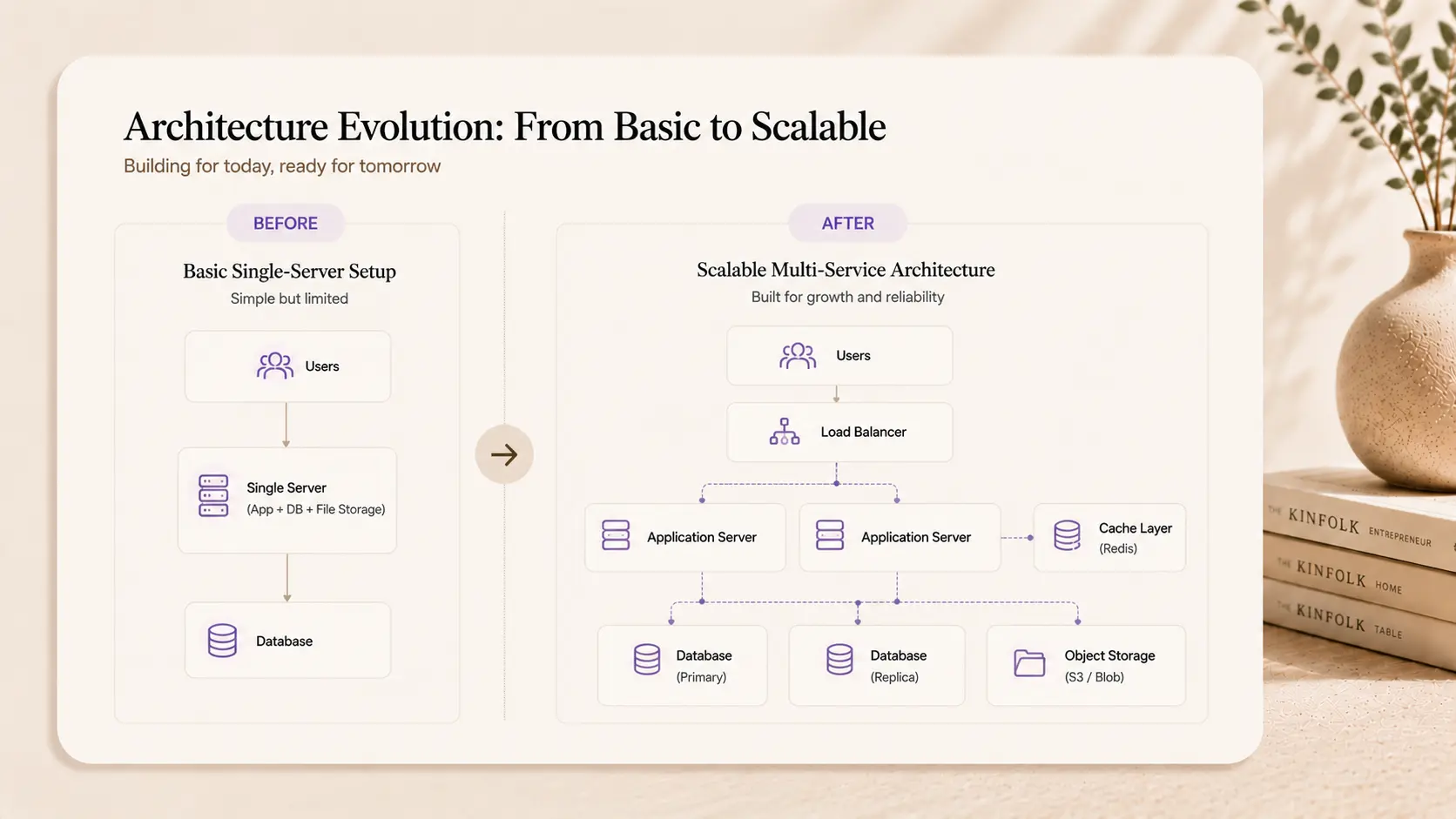
It means your system can handle more users, more data, and more traffic without a full rebuild. Here’s how that gets achieved technically:
• Stateless backend design, so you can run multiple server instances behind a load balancer
• Database indexing, so queries don’t slow down as your data grows
• Caching layer, using Redis to reduce database load for frequent reads
• CDN, serving static assets from edge locations close to your users
• Horizontal scaling, adding more servers instead of bigger servers
You don’t need all of this on day one. But your architecture needs to support it when the time comes. The mistake is building in ways that make scaling impossible without a rewrite.
Hosting & Infrastructure for SaaS Products
Where you run your product matters. The wrong choice means slow load times, unreliable uptime, or painful scaling.
The most common hosting options for SaaS:
Platform | Best For | Notes |
Vercel | Next.js frontends, serverless | Extremely fast deploys, great DX |
Railway / Render | Full-stack early-stage SaaS | Simple, affordable, fast to set up |
AWS / GCP / Azure | Enterprise, complex infra | Powerful but steep learning curve |
Supabase / Firebase | Database + auth as a service | Great for faster MVPs |
For most early-stage SaaS, the stack of Vercel (frontend) + Railway or Render (backend) + Supabase (database + auth) gets you to production fast with minimal DevOps overhead.
How Createxp Approaches SaaS Web Development
There are a lot of studios that say they build SaaS products. Fewer of them actually understand the specific demands of building one, multi-tenancy, billing systems, role management, scalable architecture, clean API design.
Createxp has built this kind of product before. Repeatedly. For founders across fintech, edtech, logistics, and productivity SaaS. And the process is built around one core belief: founders shouldn’t have to choose between speed and quality.
Here’s how Createxp structures a SaaS build:
Week 1, Architecture & Discovery
Before any design or code, the team maps the full product architecture. Database schema, API structure, third-party integrations, hosting plan. Decisions that typically get deferred until mid-development get made in week one.
Weeks 2–3, Design System & UI
A complete design system is built before development starts. Component library, responsive layouts, dashboard patterns, empty states. The development team never has to guess what something should look like.
Weeks 4–8, Core Development Sprints
Authentication, database, core product features, billing integration, and admin panel, built in prioritized sprints with weekly founder check-ins. No disappearing for three weeks and showing up with a surprise.
Weeks 9–10, QA, Performance & Launch
Load testing, security review, cross-device QA, and deployment. The product that goes live has been tested properly, not just “it works on my machine.”
What makes this work is that the team is entirely in-house. The same designer who built your UI is available during development. The same developer who architected your backend is available during QA. No handoffs to subcontractors. No timezone gaps. No context lost between phases.
Createxp has taken 50+ founders through this process, and the common feedback is that the structure makes founders feel in control of something that typically feels chaotic.
Your SaaS Build Is Ready to Start The team you build with matters more than the tech stack you choose. |
Key Takeaways
• SaaS web development is fundamentally different from a regular website build, multi-tenancy, billing, roles, and scalability are non-negotiable requirements.
• For most SaaS products, React or Next.js (frontend) + Node.js or Rails (backend) + PostgreSQL (database) is a solid, proven starting point.
• Use third-party services for auth (Clerk, Auth0) and billing (Stripe), building these from scratch wastes weeks and introduces security risk.
• Realistic MVP timelines range from 4 weeks (simple single-feature) to 16+ weeks (multi-tenant B2B SaaS with teams and advanced roles).
• Scope creep and delayed decisions, not coding, are the biggest reasons SaaS builds go over time and over budget.
• Architecture decisions made in week one determine how painful or painless scaling becomes later.
• The team you build with matters as much as the tech stack you choose. Experienced SaaS builders save you months.
Frequently Asked Questions
What is the best tech stack for building a SaaS product?
For most early-stage SaaS products, Next.js (frontend), Node.js or Ruby on Rails (backend), PostgreSQL (database), and Stripe (billing) is a reliable, battle-tested combination. Add Clerk or Auth0 for authentication and you’ve covered your core infrastructure with proven tools.
How long does it take to build a SaaS web application?
A simple single-feature SaaS MVP takes 4–6 weeks with an experienced team. A multi-feature SaaS with a full dashboard, team accounts, and billing typically takes 8–16 weeks. Enterprise-grade SaaS with SSO and advanced access control can take 6–12 months.
What’s the difference between SaaS development and regular web development?
SaaS development requires multi-tenancy, subscription billing, role-based access control, and architecture designed for scale. A standard website or web app doesn’t require most of these. The complexity and planning requirements are significantly higher.
Should I use a SaaS boilerplate or build from scratch?
For non-critical infrastructure like auth and billing, use existing tools (Stripe, Clerk). For the core product logic, the part that makes your SaaS unique, build it properly. Boilerplates can speed up early setup, but they often create technical debt if the underlying architecture doesn’t match your product’s needs.
How much does it cost to build a SaaS product?
A focused MVP with a specialized studio typically ranges from $20,000 to $60,000 depending on scope. Full V1 products range from $50,000 to $150,000+. In-house teams cost more over time but give more control. The cheapest option is almost never the fastest or most reliable.
What is multi-tenancy and why does it matter for SaaS?
Multi-tenancy means your SaaS application serves multiple separate customers (tenants) from the same codebase and infrastructure, while keeping their data completely isolated. It’s what makes SaaS cost-effective to run. Without proper multi-tenancy, you’d need a separate deployment for each customer, which doesn’t scale.
Do I need a mobile app for my SaaS product?
Not necessarily at MVP stage. A well-built responsive web app covers most SaaS use cases. Mobile apps add significant time and cost. The better approach: launch a responsive web app first, validate with users, and build native mobile only if your users genuinely need it.
Warning: Working With Us May Trigger Unstoppable Momentum